sim editor · Rust · Linux and macOS

The next-generation Vim. It shows what's hidden.

sim is the next-generation Vim: written from scratch in Rust, it keeps Vim's modal editing and core keys.

It reads no modelines, loads no plugins and opens no network connection, and it puts on screen what is usually hidden: invisible characters, writes from outside the editor, repositories that would run code.

No plugins. No modelines. No network.

Free and open source (MIT OR Apache-2.0). Install with Homebrew. Or build from source. Release notes: v0.2.0
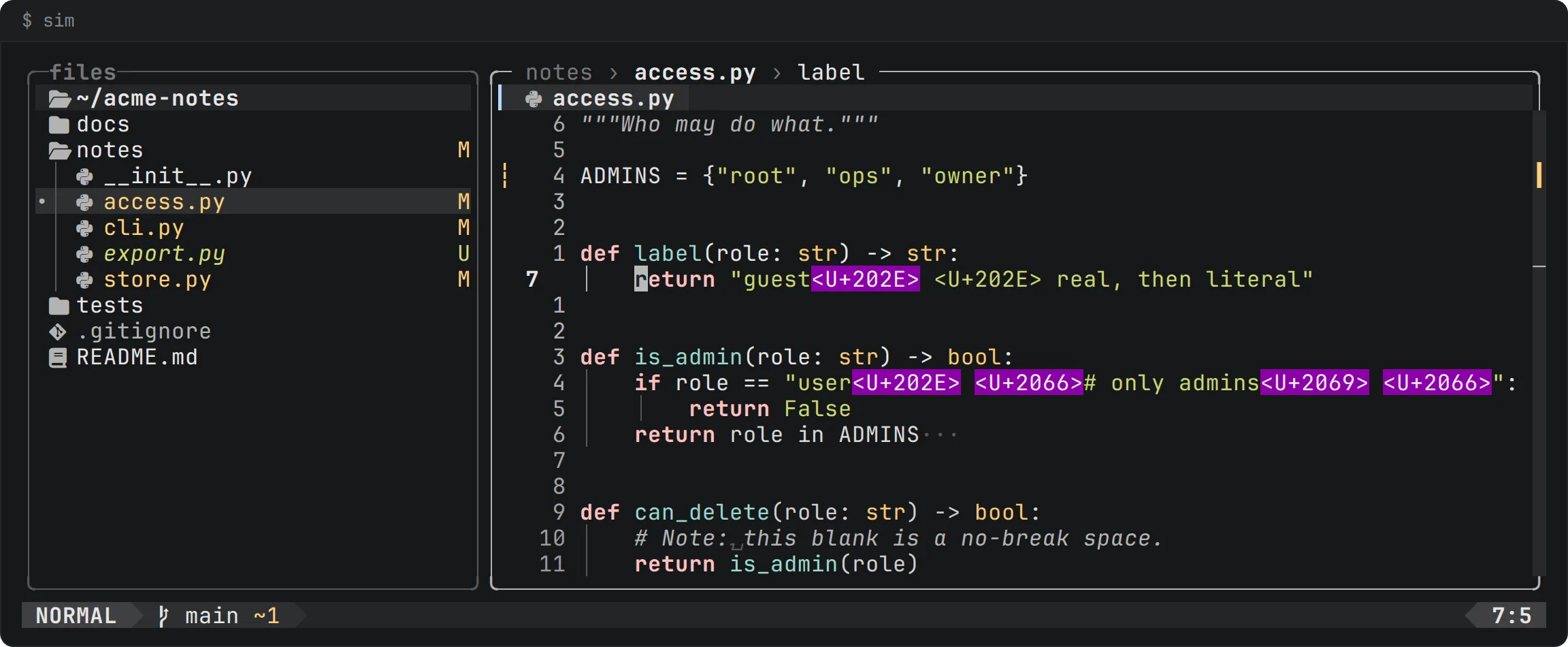
sim showing notes/access.py. Lines with a right-to-left override and isolate characters show them as <U+202E> and <U+2066> on magenta blocks. A trailing blank shows as three dots, a no-break space as a small box.
A real U+202E and the literal text <U+202E> on one line: only the real character gets the magenta block. Below it, a line in the style of Trojan Source, a trailing blank (·) and a no-break space (⍽). The tree shows git status; the gutter shows changes against HEAD.

One rule: show what is hidden

Most editor attacks work because the editor shows a file as something it is not. sim's looks (depth, fog, red and green diffs, the magenta alert badge) exist for one job: to make hidden things visible. Color follows a fixed rule, so a color always means the same thing.

What each color means

  • GrayNeutral grays and weight carry structure: text, numbers, icons, borders.
  • BlueThe one accent means “here, act”: the mode, the tab you are on, a search match, a link.
  • Green, amber, redGreen, amber and red mean change, and nothing else.
  • MagentaMagenta means only what is hidden or dangerous: a character not shown as itself, git skipped for safety.

What sim puts on screen

Five things that files and repositories hide. sim shows every one.

  • Invisible and bidirectional characters are shown

    A right-to-left override or a zero-width space is drawn as <U+202E> or <U+200B> on a magenta block, in every state, and never sent raw to the terminal. The literal text <U+202E> gets no block, so the two can be told apart.

    Read more: Invisible and bidirectional characters are shown

  • Blanks that look like nothing are marked

    Trailing blanks show as ·, a no-break space as ⍽ and a tab as »: marks no code uses, drawn over the text and never part of it.

    Read more: Blanks that look like nothing are marked

  • Writes from outside are marked

    When another process rewrites the file you have open, sim marks what changed in the text, on the tab and in the tree, and a save writes nothing if the file changed since you read it.

    Read more: Writes from outside are marked

  • Changes against git HEAD at a glance

    Signs in the gutter, a status letter for each file in the tree, and +n ~n -n in the status line, all from git, run in the background.

    Read more: Changes against git HEAD at a glance

  • A repository's own config cannot make git run a command

    A repository's own config cannot make git run a command: a monitor, hooks and filters are turned off, and where the config could still run one (core.sshCommand, an include) git is not run. The frame says which, and the status line names the key and the file.

    Read more: A repository's own config cannot make git run a command

sim in a terminal

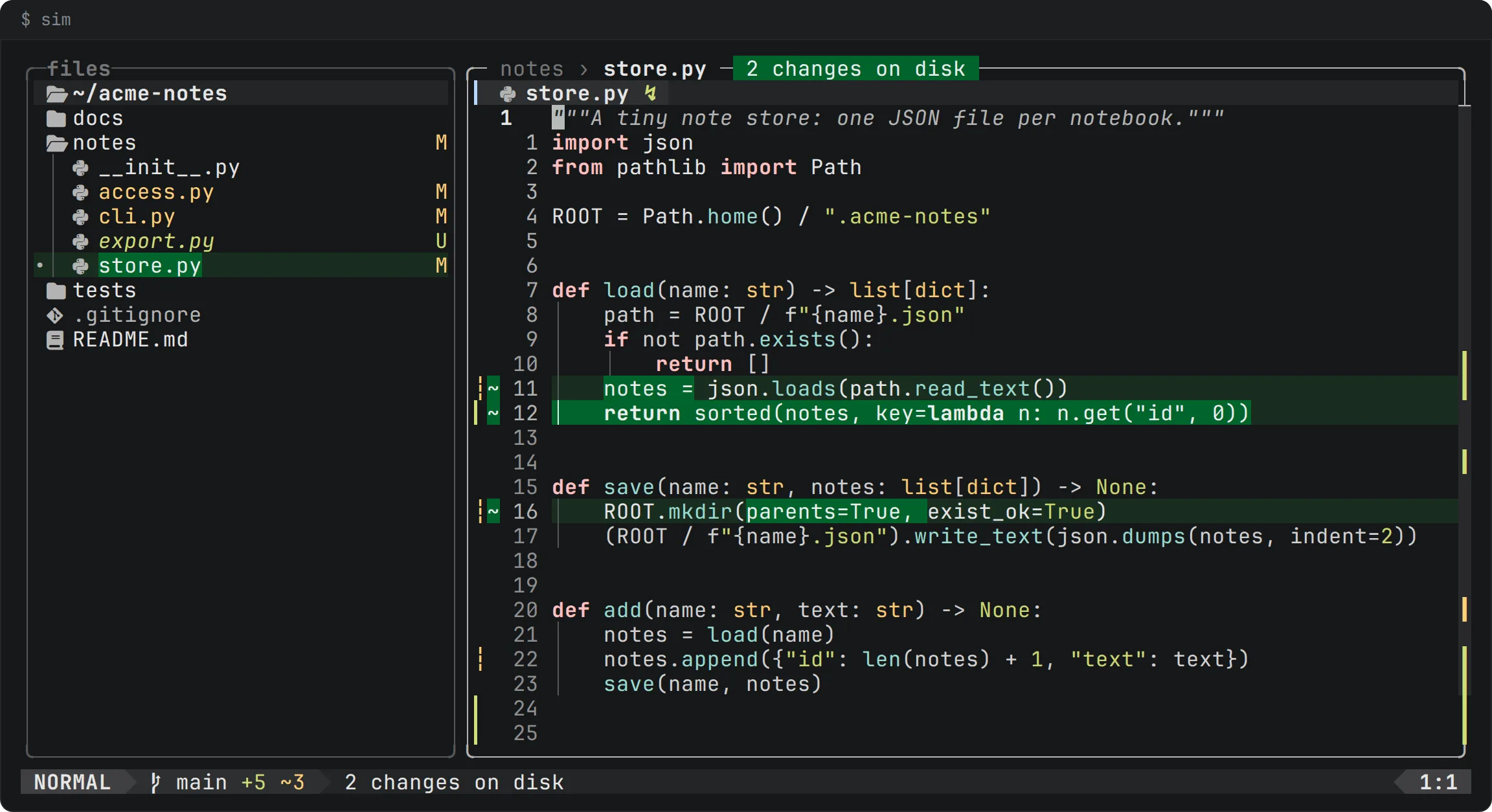
sim showing store.py after an outside write. Two changed lines are on a green background, the top border carries a green badge, 2 changes on disk, and the tab shows ↯.
Another process rewrote the open file. The changed lines are marked, the box says “2 changes on disk”, the tab shows ↯, and nothing in the buffer was lost.
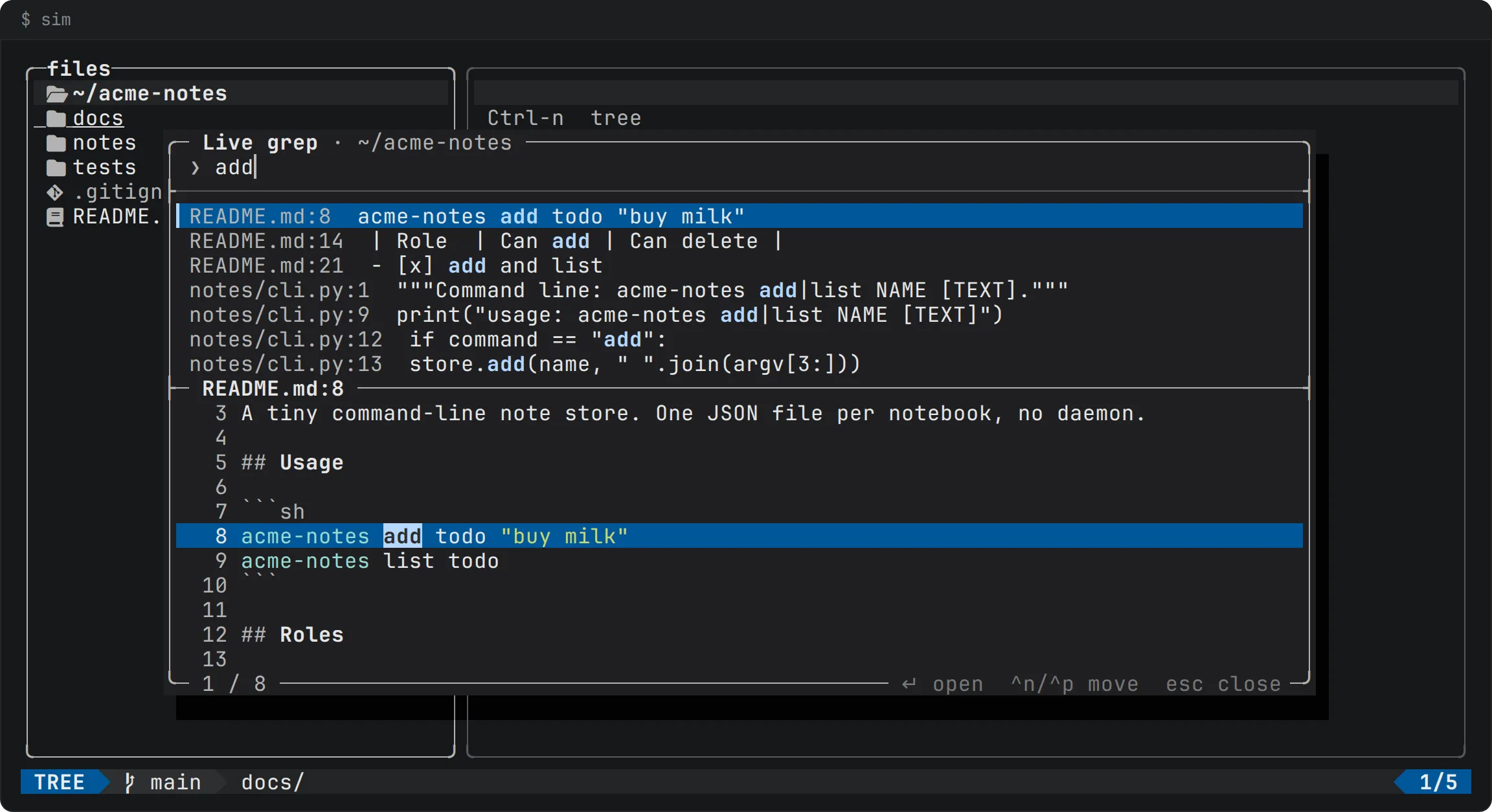
A floating window titled Live grep over the project tree, listing matching lines grouped by file, with a syntax-colored preview below.
Ctrl-f searches the contents of every file as you type, with a preview of the selected line.
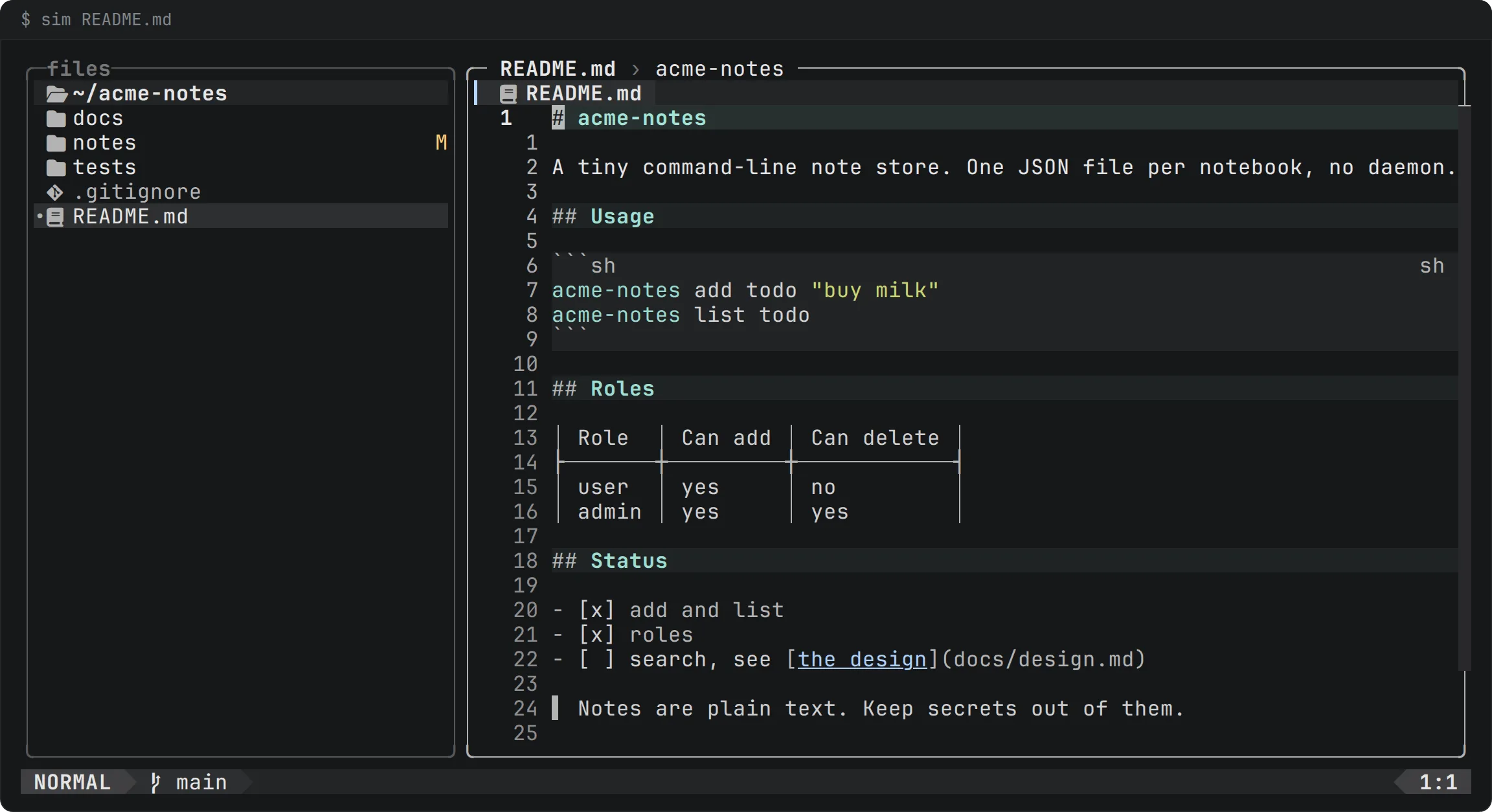
sim showing README.md with headings on bands, a fenced code block, a table aligned with bars, a task list and a quote bar; the first line, where the cursor is, shows its # as typed.
A README in the read view: headings, a table aligned by display width, a task list and a quote, drawn as they read. The line the cursor is on is the file's own text.
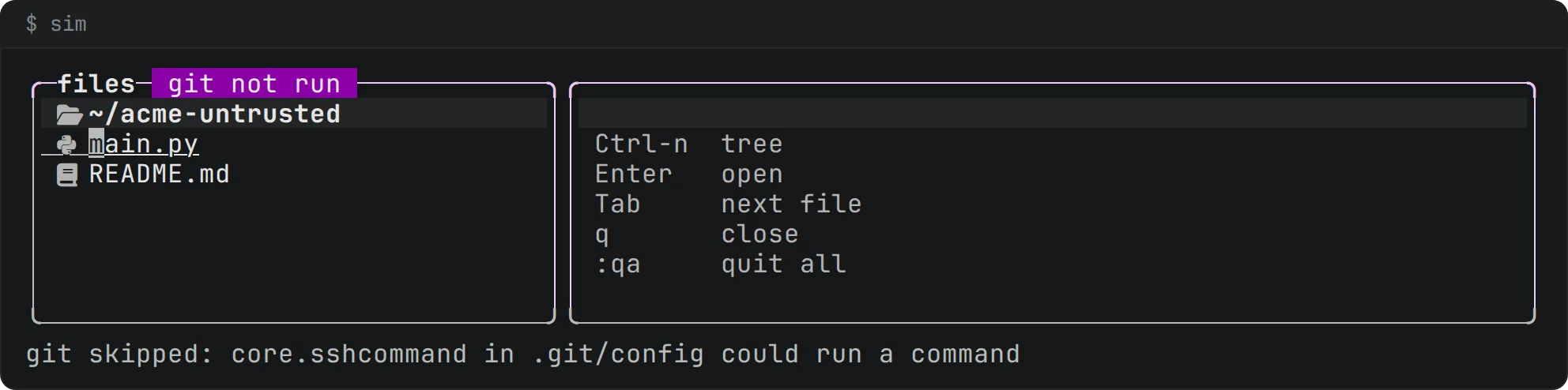
sim in a repository whose config sets core.sshCommand. The top border of the tree's box carries a magenta badge, git not run, and the status line reads: git skipped: core.sshcommand in .git/config could run a command.
In a repository whose .git/config sets core.sshCommand, sim does not run git: the tree's box says git not run, and the status line names the key and the file.

Fast. Measured, not claimed.

In the project's own benchmark (release build, a 100,000-line file, panel open, highlighting on) a key takes under 1 ms at p99. In a repository of 100,000 files the first frame is drawn before the file list is read: 1.8 to 8.7 ms measured.

Measured by the project on an AMD Ryzen 9 9950X (SPEED-1, SPEED-2 in its spec). Your machine will differ.

Against Vim, Neovim and Helix

A sourced table: plugins, modelines, project config, hidden characters and outside writes. It also says where the others still do better.

Read the comparison

Roadmap

Planned, not shipped. Nothing here is available today.

  • Macros

    Planned

  • Clipboard integration

    Planned

  • Language servers, sandboxed

    Planned

  • A GUI with real depth

    Planned

  • More ways to install

    Planned

All planned features

Run the next-generation Vim

Install with Homebrew. Or build from source. Packages for AUR and crates.io are coming soon.