An editor is the last place where a person can notice that a file is not what it looks like. This article is about one family of such files, the ones that use hidden and bidirectional Unicode characters, and about how four editors (Vim, Neovim, Helix and sim) draw them. It reports what the docs say, what we tested, and what we could not check.
The attack in one paragraph
In 2021 Nicholas Boucher and Ross Anderson showed that Unicode’s bidirectional control characters can make source code read one way on screen while a compiler reads it another way [1]. They called it Trojan Source, and it has a CVE entry, CVE-2021-42574 [2]. The cause is how text is displayed: the Unicode Bidirectional Algorithm reorders characters for display, so that Arabic or Hebrew text reads right to left inside a left-to-right line [3]. The reordering changes what a reader sees, not what is stored, and a compiler reads what is stored. A control character such as U+202E (right-to-left override) can therefore make a comment appear where the stored text has code, or the other way round. The researchers’ advice to editors is short: make these characters perceptible [1].
Here is a line in the style of the attack. The angle-bracketed tokens stand for real, invisible characters:
if role == "user<U+202E> <U+2066># only admins<U+2069> <U+2066>":
Stored, this line compares role with a string that happens to contain the words “# only admins”. An editor that draws the controls silently, or that honors them, can lead a reviewer to read it differently. That is the whole trick, and nothing in the line is visible unless the editor shows it.
What else hides in a file
Bidirectional controls are the best-known case. sim’s spec lists the following characters as ones that must never be taken at face value:
- the bidirectional controls U+200E–200F, U+202A–202E and U+2066–2069, plus U+061C (the Arabic letter mark);
- U+200B (zero-width space), and U+FEFF (the byte-order mark) anywhere but the start of a file;
- control characters: C0, DEL and C1, which a terminal may treat as escape sequences;
- blanks that look like nothing: a no-break space, trailing blanks, a tab.
That is the list of v0.1.0. sim 0.2.0 shows every character that draws nothing (SAFE-10, SAFE-11): tag characters, which can hide an instruction to an AI assistant, variation selectors, which have hidden code in published extensions, fillers, soft hyphens, line separators and unassigned code points, with a few exceptions for emoji and flags. The Security page says which and why, and the comparison shows what Neovim 0.12.5 and sim each drew for every kind.
Trojan Source has a second half, look-alike letters from other scripts (homoglyphs), which has its own CVE [1]. That half is a different problem, and we come back to it under limits.
What the four editors draw
We wrote a file with U+202E, U+2066, U+2069, U+200B, U+FEFF and a no-break space, opened it in a terminal in each editor, and looked at what was drawn. Where we did not run an editor, the table says so and cites its manual instead.
| Editor | What you see | Basis |
|---|---|---|
| Vim | <202e>, a hex token |
The manual: “Unprintable and zero-width Unicode characters are displayed as <xxxx>. There is no option to specify these characters.” [4] We did not run Vim itself. |
| Neovim | <202e>, <2066>, <200b>, <feff> |
We ran 0.12.5. Its source table of unprintable characters in 0.12.6 includes U+200B–200F, U+202A–202E, U+2060–206F and U+FEFF [6], and its manual repeats Vim’s sentence and says the SpecialKey highlight is used for unprintable characters [5]. |
| Helix 25.07.1 | Nothing: each took a blank cell | We ran the release build and logged the bytes it wrote: it did not send the characters raw. Zero-width characters are an open request, issue #11255, open since July 2024 [7], and C0 control characters being written raw to the terminal is a report, issue #16320, open since September 2026 [8]. 25.07.1 is the latest release [9]; the development branch may differ. |
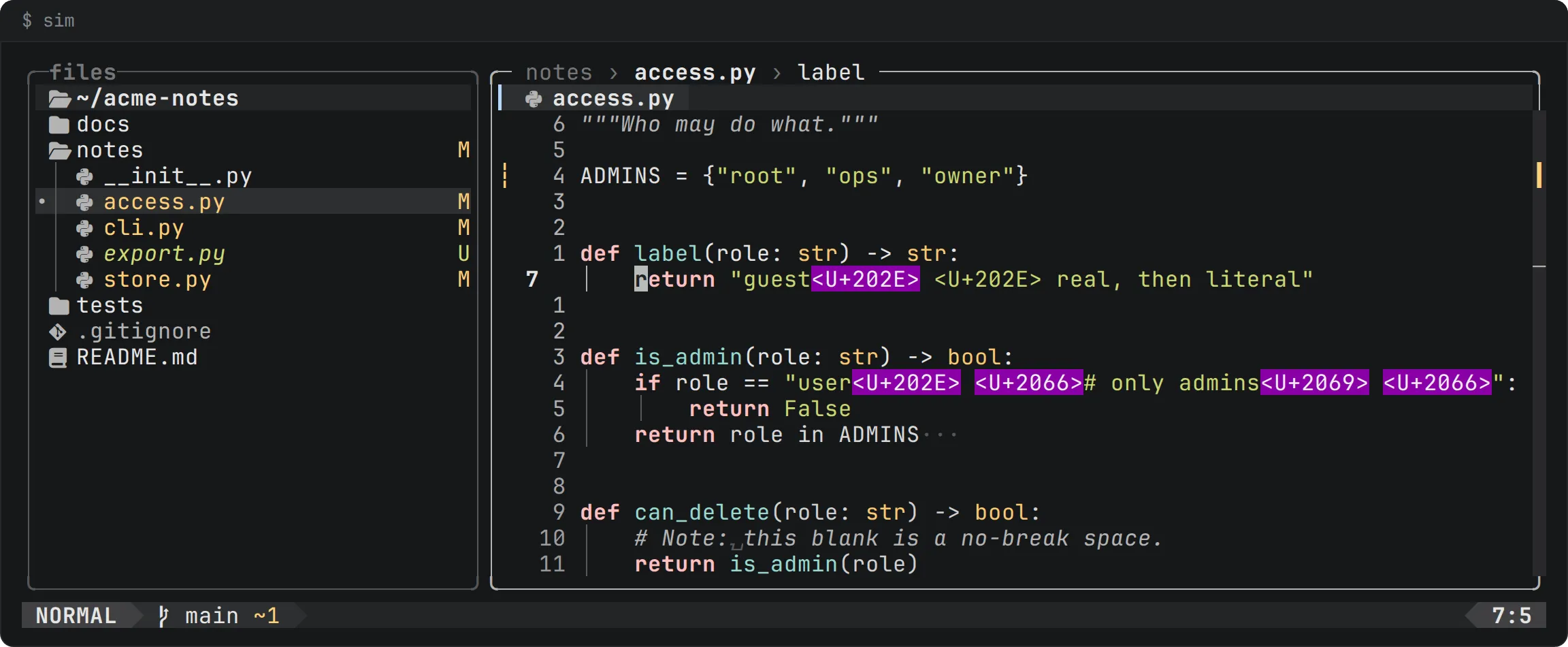
| sim | <U+202E> on a magenta block |
The spec (SAFE-8, UI-15) and our run of the installed build. |
Two things deserve to be said fairly. First, Vim and Neovim do show these characters: a reader of either sees a token where the character is. In Neovim’s default color scheme the token for a real U+202E is drawn in a different color from the same text typed into the file, so the two can be told apart there, by color. Second, Helix’s gap is a gap in a released version. Its issue tracker shows the maintainers know about it, and what a future release does is not something this article can say.
What a good display needs
Looking at the four, we think a display for hidden characters needs four properties.
- It is visible. Not a blank, not a zero-width glyph.
- It cannot be faked by typing. If the display of a real U+202E is the text
<202e>, then a file that contains those five ordinary characters must look different. A color difference is one way; a block with its own background is another. - It holds in every state a cell can be in. A character that is shown in the plain text but not when it is selected, matched by a search, on the cursor line, inside a change that came from outside, or in a faded row is a character an attacker can steer into the state where it is not shown.
- It never reaches the terminal raw. A terminal acts on escape sequences, so a control character that is written as is can do more than be invisible.
sim was built around these four. Its spec says that bidirectional controls, U+200B and a mid-file U+FEFF are shown in <U+202E> form, and that none of them is ever sent raw to the terminal (SAFE-8). In the flat and depth looks the token is drawn as a block in the alert color, magenta, which the interface uses for nothing else (UI-15, COLOR-1). The block is the last word for its cells: whatever else a cell has, a selection, a search match, the cursor line’s surface, a change’s tint, a heading’s band, the fade of a far row, the block wins. In calm, which has no colors beyond one, the token is in reverse video. The literal text <U+202E> in a file is eight ordinary characters and gets no block.
The spec also records a mistake that this property caught. A first version gave the style only to characters that were otherwise plain, so a right-to-left override written into a changed word, an attacker’s own change, was drawn without the block. A security review found it on 2026-10-17 and it was fixed; the test of each state now compares the exact sequence the painter writes for the token in all three looks.
What sim does not do
- It does not detect look-alike letters. A Cyrillic “а” in a Latin identifier is not on the list. The Unicode security reports describe that problem and its mitigations [10]; sim’s docs do not claim to address it.
- The list is fixed. In v0.1.0 it is the list above, from the spec; in 0.2.0 it is the table of Unicode 18.0.0’s invisible characters. It is not a full check of Unicode confusables.
- Showing is not blocking. A reader who sees
<U+202E>still has to decide what to do about it. sim does not refuse to open the file. - It is not a code review tool. The place where most reviewers meet Trojan Source is a web page, not an editor.
Check a tree yourself
Whatever editor you use, you can search for the characters directly. This ripgrep command lists the lines of a tree that contain a bidirectional control (we ran it on a test file):
rg -nP '[\x{202A}-\x{202E}\x{2066}-\x{2069}]' .
And this writes the demo line above into a file, with the real characters, so that you can open it in your own editor:
printf 'if role == "user\xe2\x80\xae \xe2\x81\xa6# only admins\xe2\x81\xa9 \xe2\x81\xa6":\n' > demo.py
If your editor shows nothing unusual on that line, you have learned something about your editor.