You clone a repository, or unpack an archive, or check out a pull request, and you open one file in your editor. You have not run anything. The question of this article is what the repository can still make happen, through the editor, before you decide to run anything.
There are six doors. A file can carry settings in its own text (modelines). A directory can carry configuration the editor loads (exrc, .helix). The editor can have a plugin system that runs code with your privileges. The editor can run git in the repository, and git’s configuration can name commands. The editor can run a search tool whose configuration something else controls. And the editor can start a language server the project asks for. For each door we say what the documentation and the issue trackers of Vim, Neovim and Helix say, and what sim does. We cite a source for every claim about another editor, and we say where we are only reporting a report.
Door 1: settings in the file (modelines)
A modeline is a comment such as vim: ts=4 in the first or last lines of a file that sets editor options. Vim and Neovim both have them on by default, and off for root [1] [2]. Both manuals say that no commands other than set are supported “for security reasons (somebody might create a Trojan horse text file with modelines)”, that some options are flagged so that the sandbox is in effect when their value is used, and, in the manual’s words: “So disable modelines before editing untrusted text.” [1] [2]
The mechanism has failed before. CVE-2019-12735 was a code-execution bug in modelines in Vim before 8.1.1365 and Neovim before 0.3.6: the :source! command could be reached from a modeline [3]. In 2026, CVE-2026-34982 described a modeline sandbox bypass in Vim before 9.2.0276: three options were missing the flag that keeps a modeline from setting them, and one function lacked a check [4]. Vim’s answer, in patch 9.2.0350 in April 2026, was to add a new option, ‘modelinestrict’, on by default, that lets a modeline set only a short list of options [5]. That is a strong response. It also shows what the mechanism costs: a feature with this much history needs a sandbox, a flag on each option, a whitelist, and a stream of patches.
Helix does not parse modelines. The request, issue #729, is open, and a pull request that added basic support, #7788, was closed without merging [6].
sim reads no settings and no commands from file contents, ever. There is no modeline to bypass (SAFE-9). What a modeline is mostly used for, the indent width, sim works out from the file itself: it looks at the first 1,000 lines and decides between tabs, 2 spaces and 4 (UI-6).
Door 2: configuration in the directory
Vim’s ‘exrc’ option reads .vimrc, .exrc and .gvimrc in the current directory. It is off by default, and the manual’s note is blunt: “Setting this option is a potential security leak. E.g., consider unpacking a package or fetching files from github, a .vimrc in there might be a trojan horse. BETTER NOT SET THIS OPTION!” [1]
Neovim’s ‘exrc’ is also off by default. When it is on, Neovim runs .nvim.lua, .nvimrc and .exrc files found in the current directory and its parents “if the files are in the trust list”, which you manage with :trust [2]. That is a trust database, not a switch.
Helix loads a .helix/config.toml from the workspace; its documentation of the 25.07.1 release says so [7]. Helix is the instructive case, because its development branch has a worked-out answer. A workspace-trust feature, merged in March 2026, begins with this list: “Helix has several features that can execute arbitrary code: Language servers (LSP), Debug adapters (DAP), Local workspace configuration (.helix/config.toml, .helix/languages.toml), Git integration (filters and other commands in a repository’s .git/config)”. It puts these behind per-workspace trust, in the style of direnv. By default language servers still start automatically, because their binaries come from PATH and not from the workspace, while loading local config and trusting a repository’s git config require opting in. Helix also records a hash of every file under .helix/, so that a change after you granted trust is noticed [8] [9]. It is not in a release: the latest Helix release is 25.07.1, from July 2025 [10]. Anyone reading Helix’s behavior from a release, as we did for the 25.07.1 documentation, will see the older state.
sim has no config files and no project-local configuration. The only settings it remembers between runs are your choice of look, your choice of icons and your choice of Markdown view, one word each, in its state directory. Nothing in a repository can add to that.
Door 3: plugins
A plugin system is code that runs with your privileges, by design. Vim and Neovim have extensive ones, and that is much of why people use them. Helix has none in a release; a plugin system based on the Steel dialect of Scheme is an open draft pull request, #8675, last updated on 2026-10-09 [11].
sim has none, and says so in its concept document: plugins are on its list of things it does not build. This is a trade. If you rely on a plugin ecosystem, sim is not for you today, and we would rather say that than imply otherwise.
Door 4: git
This is the door that surprises people, because an editor that never runs your code can still ask git for the status of a repository, and git reads the repository’s own configuration.
core.fsmonitor is the example in git’s documentation. Its value is “the pathname of the ‘fsmonitor’ hook command”, which git runs to learn which files changed, and git commands that need to refresh the index, such as git status, do this [12]. In 2022 Justin Steven documented how a crafted .git/config in an unpacked directory, including a bare repository buried inside a normal one, makes any tool that runs git status execute that command. He named Visual Studio Code (CVE-2021-43891) and the JetBrains IDEs (CVE-2022-24345) among the affected, along with several shell prompts [13]. Filter drivers are similar: filter.<driver>.clean and .smudge name programs that run on a file’s content.
The same class of problem is open in Helix today. Issue #15594, opened in April 2026 and still open when we checked, reports that opening a file makes Helix compute the diff gutter through git’s filter pipeline, which runs a smudge command from .git/config before the workspace trust prompt appears. The report notes that it needs a crafted .git directory, which a normal git clone does not produce, but an extracted archive can [14]. We cite it as a report that is open; we have not reproduced it.
sim runs git: for the tree’s status letters, for the gutter signs, for the file list and for the changes tree. Its rule is that git never runs a command because the repository’s own configuration names one.
- Before any other git command, sim asks git for the repository’s configuration with
git config --list --show-scope --show-origin -z. Reading configuration runs no command. sim lets git parse it, rather than writing a second parser that could disagree. - What a command line can stop, sim stops, and git still runs. Every git command of sim’s is built in one function: no shell,
core.fsmonitor=false, an empty private directory ascore.hooksPath,--no-optional-locks, no external diff and no text conversion, and, for every filter the repository’s configuration names, an emptyclean,smudgeandprocess. A repository that sets a file system monitor, hooks, a filter or an external diff is therefore no reason to refuse: git answers, and the tree says how many of the repository’s settings were turned off (2 git settings off). The cost is that a file a filter converts looks changed, because git compares the work tree with the blob; git-lfs’s own filter, asgit lfs installwrites it, is left alone. - Where the configuration could still make a command run that the command line does not stop, git is not run. The test is a class, not a list of today’s keys: any entry from the repository’s own scopes (local and worktree, and the files they include) whose section is
include,includeIforprotocol, or whose variable is one ofdriver,helper,askpass,editor,pager,gitproxy,uploadpack,receivepackorvcs, or ends incommand,cmd,programorhook(core.sshCommandis one). Your own system and global configuration are trusted. A configuration git cannot read is a skip too. - git never fetches for sim, whatever the configuration says: it runs with
GIT_NO_LAZY_FETCH=1,GIT_ALLOW_PROTOCOL=sim-noneandGIT_TERMINAL_PROMPT=0, so that a partial clone cannot be made to fetch and run anuploadpackcommand. - sim never runs a git command that writes, so no hook runs, and the empty hooks path stops the one hook a read could reach:
post-index-changeruns when git writes the index [15], whichgit statusmay do to save what it learned, and--no-optional-locksstops that write too. This is a claim of sim’s spec, which says it is checked with a repository that has a script for every hook.
The result is visible. In a repository that sets core.sshCommand, a key that nothing turns off, the tree shows no git marks and says git not run, and the status line names the key and the file:
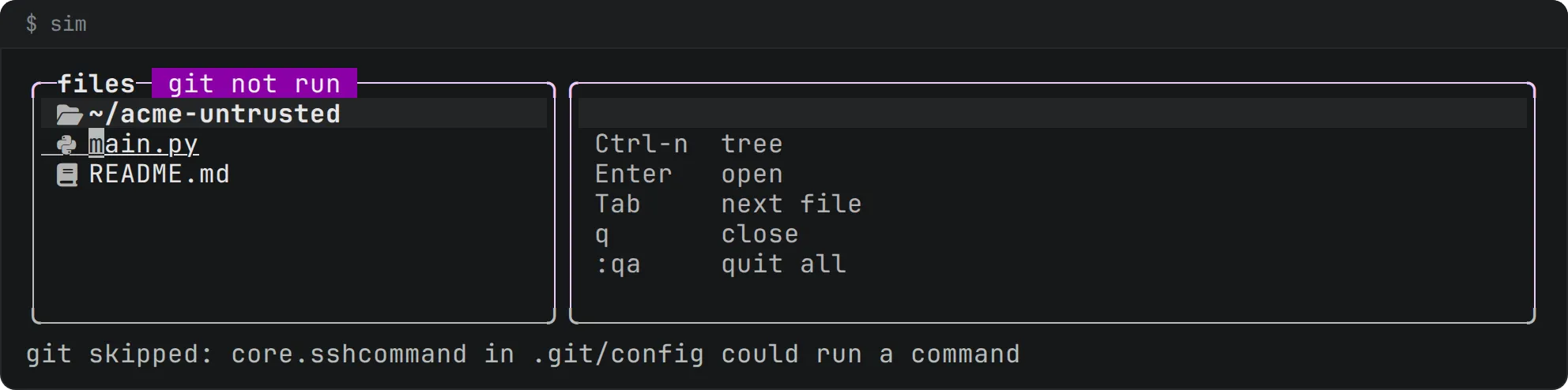
The cost is real. In a repository like that, sim has no status letters and no gutter signs, and the files come from a directory walk instead of git ls-files. We think that is the right default for something you have just unpacked.
Door 5: search tools
A fuzzy finder or a live search usually runs ripgrep. ripgrep reads extra flags from a config file named by the RIPGREP_CONFIG_PATH environment variable, and its --pre flag runs a command on each file before searching it [16]. Both are legitimate and useful, and both are ways for something other than you to decide what runs.
sim finds rg itself, in the absolute entries of PATH (an empty or relative entry would find ./rg in the repository), and runs it by its full path with an empty environment and --no-config, never with --pre. The query follows -e and the files follow --, so none of them can be an option. If ripgrep is missing or fails, a built-in reader does the search. A search never writes, and never follows a symlink out of the project root.
Door 6: language servers
A language server is a program a project asks your editor to start, and it often runs the project’s own build machinery. It is probably the biggest door of all.
Helix’s trust document says that, by default, language servers start automatically, with their binaries coming from PATH rather than the workspace, and that loading a workspace’s .helix files and trusting its git config requires opting in [8]. That is a design decision, stated openly.
sim has no language server client yet, so this door does not exist in it, and we do not claim a protection for it. A sandboxed client, and an indicator of whether the project root is trusted, are on its roadmap; they are planned, not shipped.
The doors in a table
| Door | Vim | Neovim | Helix | sim |
|---|---|---|---|---|
| Modelines | on (off for root); ‘modelinestrict’ since 9.2.0350 | on (off for root) | not parsed | never read |
| Directory config | ‘exrc’, off by default | ‘exrc’, trust list | .helix/ loaded in 25.07.1; trust on the development branch |
none exists |
| Plugins | yes | yes | no release has them; draft PR | none, by design |
| git config that runs commands | not covered here | not covered here | open report #15594; trust on the development branch | monitor, hooks, filters and external diff turned off; any other key that could run a command: not run, the key is named |
| Search tools | not covered here | not covered here | not covered here | ripgrep run with an empty environment and --no-config, never --pre |
| Language servers | not covered here | not covered here | start automatically by default | not built; sandbox planned |
“Not covered here” means we did not find a primary source to cite, and so we say nothing.
What you give up
sim’s position is that fixed behavior is worth less flexibility. In exchange for it you give up modeline-driven settings, project-local configuration and plugins, and you wait for language servers. If those matter to you more than the guarantees, Vim, Neovim and Helix are mature editors with serious answers of their own, and Helix’s trust model is worth reading even if you never use it.