The promise sim makes about your text is one sentence: without an explicit action, nobody’s text is lost, whether it is yours, another process’s, or a tool’s. This article explains what that costs in code, how it is tested, where it stops, and what it means for secrets: a password in a file you edit, a token you yank.
It is sim’s own account of itself, taken from its spec and its notes. Where we compare with another editor we cite that editor’s documentation or issue tracker.
Three ways to lose text
An editor can lose text in three ways, and each needs a different defense.
- A save that half-happens. The process dies, or the disk fills, between truncating the old file and finishing the new one.
- A save that overwrites someone else. A build, a formatter or a tool rewrote the file after you opened it, and your save puts your older version over theirs.
- A crash before any save. The editor dies, the terminal closes or the process is killed with
kill -9, and the changes you had not saved are gone.
Defense 1: a save that cannot half-write
sim saves in a fixed order (SAFE-1):
- create a temporary file in the same directory as the target, with mode 0600 and
O_EXCL(so it cannot be a link someone planted); - write the new content to it;
fsyncit;- rename it over the target;
fsyncthe directory.
Whichever step fails, either the old version or the new one is intact. The rename is atomic on the same file system, which is why the temporary file is next to the target. Before the rename the temporary file gets the original’s mode and group, so a file you made private stays private. A symlink is saved through to its target and the link stays.
Some files cannot be replaced by a rename: a file owned by someone else, a file with two or more hard links, a file in a directory you cannot write to, or a file that is a mount point (a bind-mounted config in a container answers EBUSY to a rename). For those, sim saves in place (SAFE-2). It first writes a recovery copy and syncs it, saves, and deletes the copy once the save has succeeded. If the in-place write fails, the status line names the recovery copy. The in-place path opens the file without following a final symlink and checks that the opened file is the one it validated, so a file swapped in between is refused instead of written through.
sim also refuses to write through a link someone else owns, in any component of the path, in the way that Linux’s fs.protected_symlinks does. The point is a link planted in a shared directory such as /tmp.
Opening a file and saving it without editing gives byte-identical output: line endings, whether the file ends with a newline, a byte-order mark and permissions are kept (SAFE-3). A file that is not valid UTF-8, or has a NUL in its first 8 KB, opens read-only with the reason shown, because the text on screen would not be the file (SAFE-4).
How this is tested matters more than how it is written. The save has a test-only hook that can fail each step of the sequence, and the test checks that wherever it fails, either the old or the new version is whole. Property tests check that a round trip is byte-identical. A model of the whole shell (a save thread, a watcher, an outside process) runs random sequences against the rule that nobody’s words are lost.
For comparison: Vim and Neovim both document an ‘fsync’ option that is on by default [1] [2]. For Helix, issue #15615, opened in April 2026 and open when we checked, reports that when the file already exists Helix writes it in a non-atomic way instead of writing a temporary file, calling fsync and renaming [4]. That is a report with a trace, and we have not reproduced it.
Defense 2: a save that checks first
Atomic is not enough. If another process rewrote the file after you opened it, an atomic save still replaces its work with yours. So sim keeps a hash of the file as it read it, and right before the rename compares it with a hash of the file on disk (SAFE-5). If they differ, nothing is written. The check is a compare-and-swap and runs on the save thread, so a key never waits for it.
The check has a second layer. Reading and hashing a large file takes time, so right before the rename sim looks at the file’s stamp (device, inode, size, modification and change times) before and after the read, and hashes again only if the stamp moved. A target that is not a regular file, for example a FIFO that replaced the file, is refused before it is read, because the read could wait for ever.
The spec says where this stops: “A write in the same microsecond, or a same-size rewrite within one timestamp tick of a coarse file system, can still slip through.” We would rather print that sentence than leave it out.
What the others do, from their documentation: Vim and Neovim remember the file’s timestamp, mode and size when you start editing, compare them at certain moments, and warn when they differ; ‘autoread’ reloads a buffer you have not changed [3] [8]. Helix refuses a write with “file modified by an external process, use :w! to overwrite”, as quoted in issue #6492, which asks for the message to be louder [5]; automatic reload is an open request, issue #1125 [6].
Outside writes: seeing them as they happen
sim also notices the change while you edit. It watches the file’s directory, so it sees saves done by rename, deletion and re-creation, not only in-place writes. It recognizes its own saves by the hash of the bytes it wrote, and does not mistake them for outside changes. A watch can die silently, when a directory is deleted and made again or when a file system sends no events, so the watcher also looks at the file’s stamp once a second.
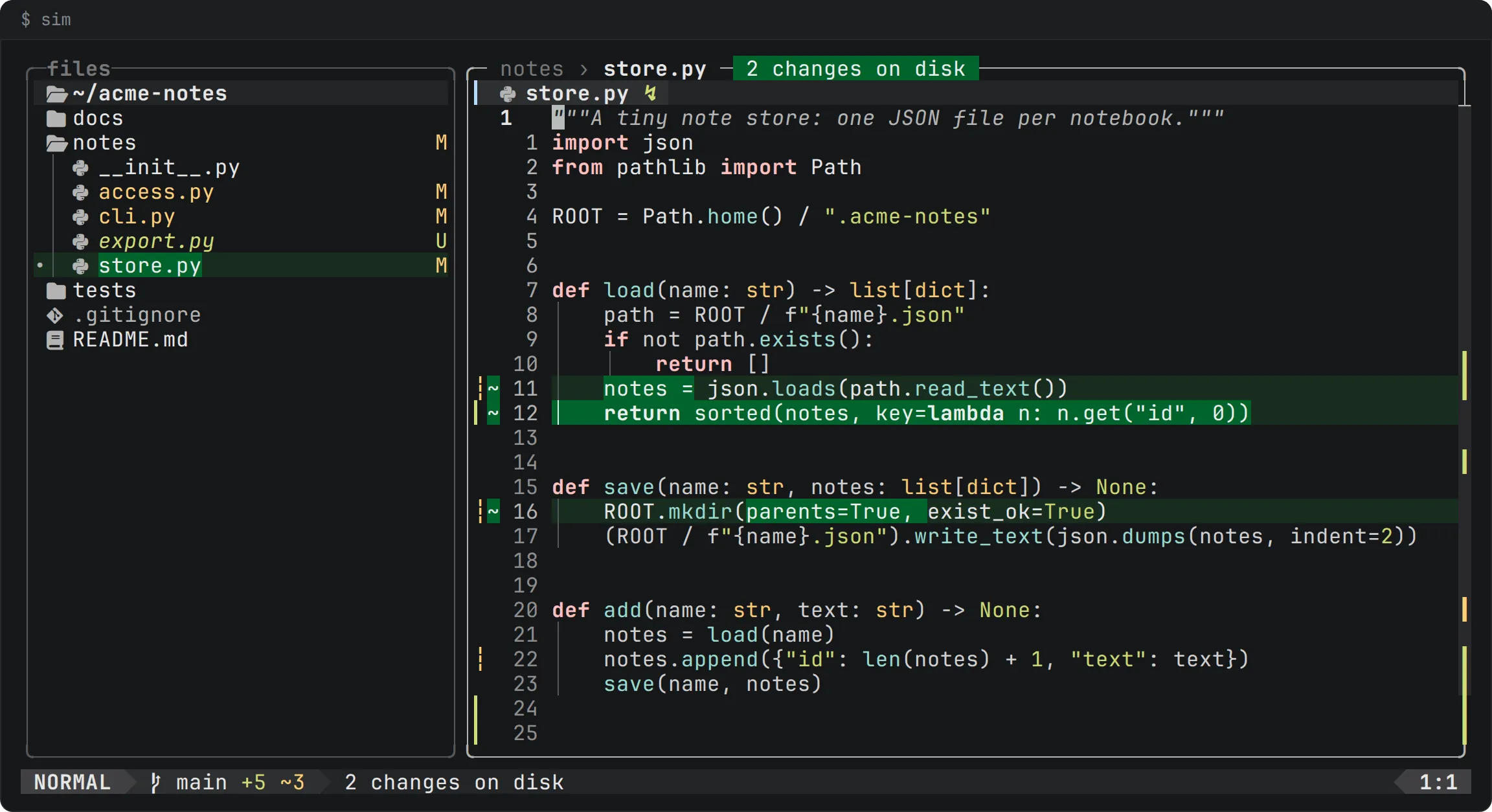
When the file changes and your buffer is clean, sim reloads it and marks what changed: the lines in the text, a badge on the box saying how many changes are on disk, a dot on the tab and a mark on the file in the tree. The marks stay until your cursor enters the line, so you see each change at least once.
Defense 3: snapshots
The last defense is for text you have not saved. sim snapshots unsaved changes at most once per second into a state directory (SAFE-6). A snapshot holds the path, the text the file had when you opened it and the text in your buffer, in a file with mode 0600. If the process dies, because of a crash, kill -9 or a closed terminal, opening the file again offers the unsaved changes back as one undo step, and the status line says how old they are. At most one second of work is lost. SIGTERM and SIGHUP are caught: sim writes a last snapshot and exits with 128 plus the signal number.
A snapshot is deleted after a successful save, and when you quit with :q, :q! or :cq. It stays after a crash or a signal, because that is what it is for.
The directory has rules. It must be a real directory, not a symlink, owned by you, with no access for group or others (mode 0700). Without $XDG_STATE_HOME or $HOME there is no directory, and sim never falls back to a shared one such as /tmp: snapshots are off, and the status line says so once. Snapshots of files that are not owned by you are ignored.
Secrets
A secret in a text editor is just text, and sim does not know which text is secret. Here is what the machinery above means for it, plainly.
In a file you save. A file you made private stays private: the temporary file takes the original’s mode before the rename, and its first mode is 0600. A new file gets the mode any new file would get from your umask.
In a buffer you have not saved. Snapshots hold the text of your buffer, so a secret you pasted into an unsaved buffer is written to the state directory, readable by you only, within a second. It is removed when you save or quit normally. If the editor crashes or is killed, it stays until you open that file again and finish. This is a consequence of the “nothing is lost” promise, and we think you should know it. A recovery copy from an in-place save is written the same way.
On the clipboard. Every yank in sim also goes to the system clipboard, through the terminal’s OSC 52 sequence (VI-8). A delete or a change fills only sim’s own register, so x and dd never overwrite what you copied, and never put what you deleted on the clipboard. Inside tmux, sim also sends the sequence wrapped in tmux’s passthrough, because tmux’s set-clipboard external setting ignores attempts by applications to set tmux’s own buffers [7]. A yank says what it took (“3 lines yanked”), since the clipboard gives no other sign.
What follows from this: if you yank a secret, it reaches the system clipboard, and from there it is as exposed as anything on your clipboard, to whatever reads it. sim cannot control that. The sound habits are the old ones: do not yank a secret you do not need to, and clear the clipboard afterwards. sim’s docs describe more clipboard integration as planned, and what it will do is not something to claim before it exists; today it is this OSC 52 copy.
What it does not do
The spec’s own notes list some limits we should repeat:
- The atomic save does not keep ACLs or extended attributes, because that would need a dependency.
- The snapshots of a session that died are not offered back while its process id has been reused by a live process.
- A file that changed in the same timestamp tick can slip past the compare, as quoted above.
- sim does not encrypt snapshots, and does not know what a secret is.
None of these is a reason to skip the defenses. They are the places to look when you decide how far to trust them.